Quick Start
Installation
The recommended and straightforward installation is:
hrtfpykit requires Python 3.12 or newer.
pip install hrtfpykit
For local installation from source:
git clone https://github.com/ArielAlvarez-Martinez/hrtfpykit.git
cd hrtfpykit
pip install .
For local development from source:
git clone https://github.com/ArielAlvarez-Martinez/hrtfpykit.git
cd hrtfpykit
pip install -e ".[test,docs]"
Main imports
These imports cover the main hrtfpykit workflows: SOFA loading, HRTF objects, spherical harmonics, comparison plots, reconstruction plots, dataset classes, dataset specs, and batching utilities.
from hrtfpykit.sofa import load_sofa

from hrtfpykit.hrtf import load_hrtf
from hrtfpykit.hrtf import SH, sht, sht_inverse, sht_error

from hrtfpykit.plots import plot_amplitude, plot_magnitude, plot_absolute_itd, plot_ild
from hrtfpykit.plots import plot_source_grid, plot_spectrum_plane
from hrtfpykit.plots import compare_amplitude, compare_magnitude, compare_absolute_itd, compare_hrtf_difference
from hrtfpykit.plots import sht_reconstruction_comparison, sht_reconstruction_error

from hrtfpykit.datasets import HUTUBS, SONICOM
from hrtfpykit.datasets import HRTFSpec, ITDSpec, ImageSpec
from hrtfpykit.datasets.torch import collate_samples
Download Two SONICOM Example HRTFs
The examples below use the first two public SONICOM subjects. Run this setup
once to download the measured 44.1 kHz FreeFieldComp HRTF resources for
P0001 and P0002 and store their local paths.
from pathlib import Path

from hrtfpykit.datasets import SONICOM

root = Path("datasets/sonicom")

# Keep the example small: use only P0001 and P0002.
selected_subject_ids = ("P0001", "P0002")

# Download only the measured 44.1 kHz FreeFieldComp HRTF resources for P0001 and P0002.
SONICOM(
    root=root,
    download=True,
    download_resources="hrtf",
    download_hrtf_variant={
        "type": "measured",
        "sample_rate": 44100,
        "version": "FreeFieldComp",
    },
    download_subject_ids=selected_subject_ids,
    subject_ids=selected_subject_ids,
    verify_checksum=True,
)

hrtf_path_a = (
    root
    / "P0001"
    / "HRTF"
    / "HRTF"
    / "44kHz"
    / "P0001_FreeFieldComp_44kHz.sofa"
)
hrtf_path_b = (
    root
    / "P0002"
    / "HRTF"
    / "HRTF"
    / "44kHz"
    / "P0002_FreeFieldComp_44kHz.sofa"
)
hrtfpykit.sofa: Working with SOFA files
The sofa API is hrtfpykit’s interface to the SOFA file structure. It exposes dimensions, variables, global attributes, convention metadata, and stored arrays as Python objects. The example below loads a file, checks its metadata and source positions, reads HRIR data, edits a cloned SOFA object, and writes the edited file. For a longer guide to SOFA inspection, editing, validation, and saving, see Starting with hrtfpykit.sofa.
import numpy as np

from hrtfpykit.sofa import load_sofa

# Load SOFA file
sofa = load_sofa(hrtf_path_a)

# SOFA file summary
print(sofa.summary())

# Access SOFA file metadata
print(sofa.GlobalAttributes.get("SOFAConventions").value)
print(sofa.Dimensions.get_names())
print(sofa.Variables.get_names())

# Access SOFA file data
source_positions = sofa.Variables.get("SourcePosition").value
print(source_positions.shape)

if "Data.IR" in sofa.Variables.get_names():
    ir = sofa.Variables.get("Data.IR").value
    print(ir.shape)

# Modify SOFA data on a clone
editable = sofa.clone()
editable.create_global_attribute("ExampleNote", "edited with hrtfpykit")

if "Data.IR" in editable.Variables.get_names():
    edited_ir = np.array(editable.Variables.get("Data.IR").value, copy=True)
    edited_ir[..., :8] = 0.0
    editable.modify_variable("Data.IR", edited_ir)

# Save SOFA file
saved_path = editable.save("P0001_FreeFieldComp_44kHz_edited.sofa", overwrite=True)
print(saved_path)
hrtfpykit.hrtf: Handling HRTF objects
The hrtf API is the main interface for loaded HRTF and
HRIR data. An HRTF object keeps IR values, TF values,
source positions, metrics, transforms, and the backing SOFA object aligned. The
example follows the object workflow: load an HRTF, inspect the time and
frequency representations, select directions and samples, apply a window,
synchronize the SOFA representation, reset from SOFA, and save. The HRTF
tutorial then extends that workflow into transforms, metrics, and spherical
harmonics:
Starting with hrtfpykit.hrtf.
from hrtfpykit.hrtf import load_hrtf

# Load HRTF file
hrtf = load_hrtf(hrtf_path_a)

# Access SOFA backed object
sofa = hrtf.Sofa
print(sofa.summary())

# Inspect HRTF metadata
print(hrtf.SOFAConventions)
print(hrtf.fft_length)

# Inspect time domain data
print(hrtf.IR.values.shape)
print(hrtf.IR.sample_rate)
print(hrtf.IR.ir_length)
print(hrtf.IR.ir_duration)

# Inspect frequency domain data
print(hrtf.TF.values.shape)
print(hrtf.TF.frequency_bins.shape)
print(hrtf.TF.min_frequency_bin)
print(hrtf.TF.max_frequency_bin)

# Inspect source positions
print(hrtf.Sources.get_positions().shape)
print(hrtf.Sources.get_azimuth_angles())
print(hrtf.Sources.get_elevation_angles())

# Create a selected HRTF copy
selected = hrtf.select(
    positions=["front", "left", "right"],
    ear="both",
    start_sample=0,
    end_sample=128,
)

# Create a modified HRTF copy
windowed = selected.transform.apply_window("hann")
print(hrtf.is_transformed())
print(windowed.is_transformed())

# Synchronize current HRTF data into its SOFA object
windowed.update_sofa(
    change_sofa_dimensions=True,
    sofa_convention="SimpleFreeFieldHRIR",
)

# Reset in-memory data from the backed SOFA object
restored = windowed.reset()

# Save HRTF file
saved_path = restored.save(
    "P0001_FreeFieldComp_44kHz_selected_windowed.sofa",
    overwrite=True,
    change_sofa_dimensions=True,
    sofa_convention="SimpleFreeFieldHRIR",
)

print(saved_path)
hrtfpykit.plots: Visualizing HRTF data
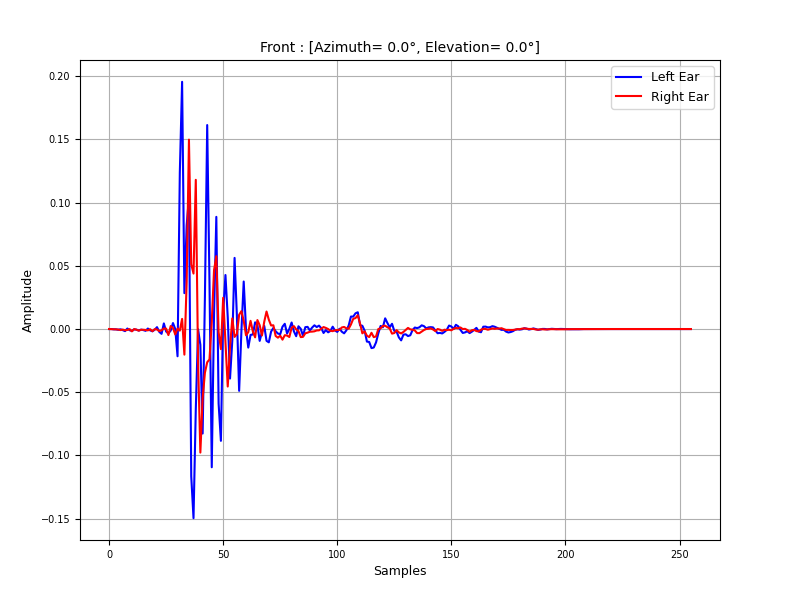
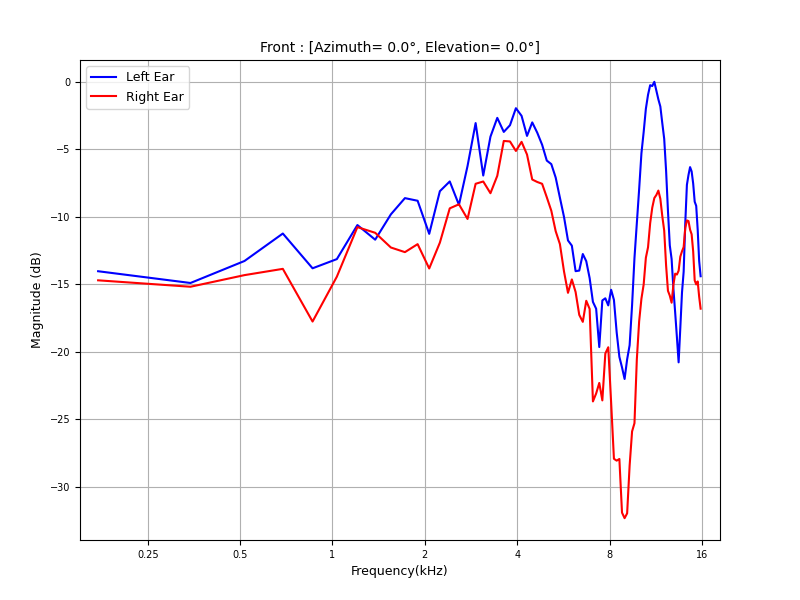
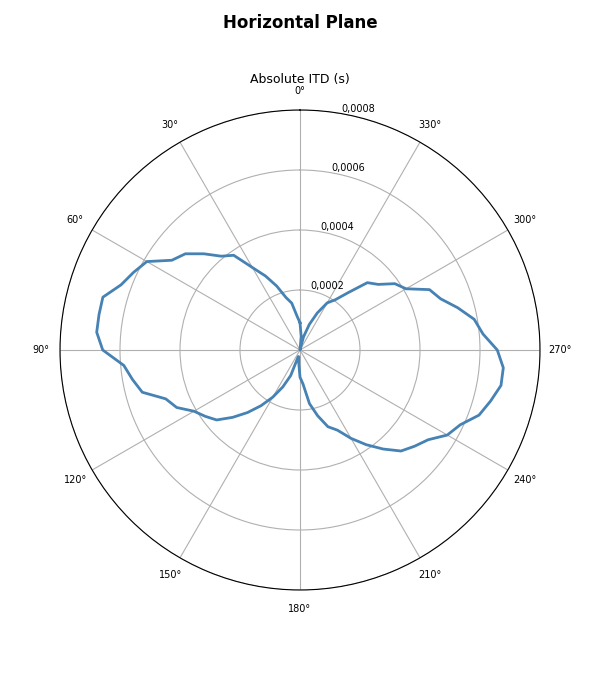
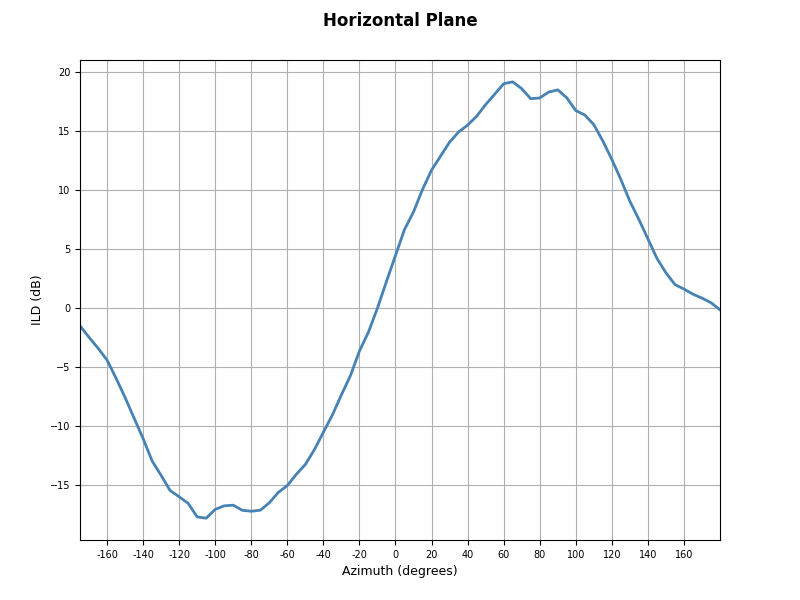
The plots API turns loaded HRTF objects and metric outputs into figures for inspecting spatial acoustic behavior. The examples begin with individual HRTF views: HRIR amplitude, HRTF magnitude, absolute ITD, signed ILD, source grids, and spectrum planes. They then move to pairwise comparisons with amplitude, magnitude, absolute ITD, and HRTF difference maps, including LSD scatter and heatmap views. For figure controls, plane plots, comparison maps, cue difference maps, and spherical harmonic figures, see Starting with hrtfpykit.plots.
from hrtfpykit.hrtf import load_hrtf
from hrtfpykit.plots import plot_amplitude

hrtf = load_hrtf(hrtf_path_a)
plot_amplitude(
    hrtf,
    positions="front",
    ear="both",
    x_axis="samples",
)
from hrtfpykit.hrtf import load_hrtf
from hrtfpykit.plots import plot_magnitude

hrtf = load_hrtf(hrtf_path_a)
plot_magnitude(
    hrtf,
    positions="front",
    x_axis="log",
    ear="both",
    reference="max",
    freq_max=16000.0,
)
from hrtfpykit.hrtf import load_hrtf
from hrtfpykit.plots import plot_absolute_itd

hrtf = load_hrtf(hrtf_path_a)
plot_absolute_itd(hrtf, plane_angle=0.0)
from hrtfpykit.hrtf import load_hrtf
from hrtfpykit.plots import plot_ild

hrtf = load_hrtf(hrtf_path_a)
plot_ild(hrtf, plane_angle=0.0)
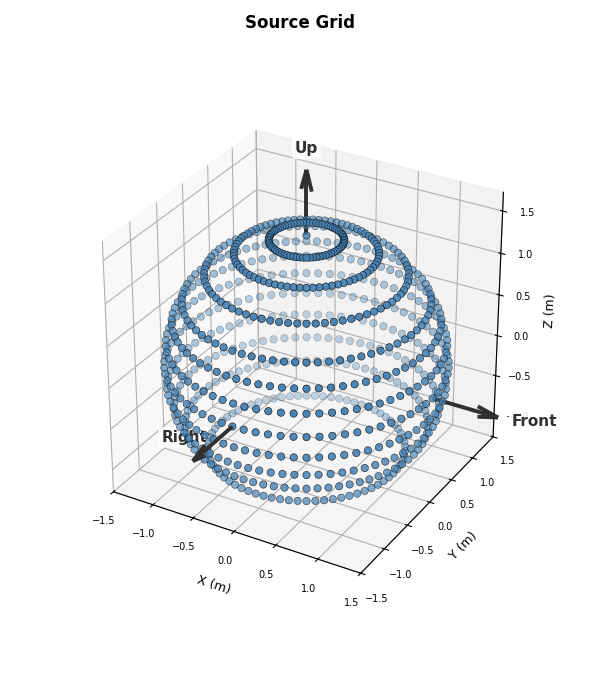
from hrtfpykit.hrtf import load_hrtf
from hrtfpykit.plots import plot_source_grid

hrtf = load_hrtf(hrtf_path_a)
plot_source_grid(hrtf)
from hrtfpykit.hrtf import load_hrtf
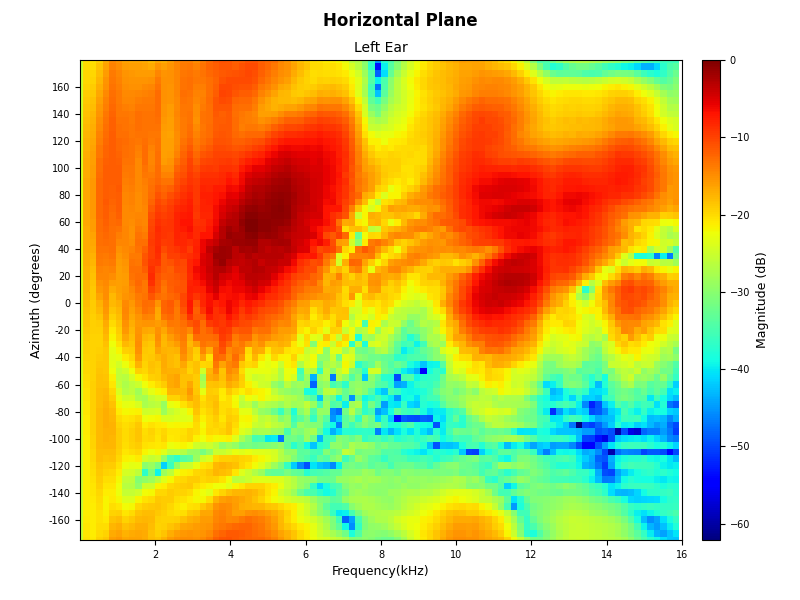
from hrtfpykit.plots import plot_spectrum_plane

hrtf = load_hrtf(hrtf_path_a)
plot_spectrum_plane(
    hrtf,
    plane="horizontal",
    plane_angle=0.0,
    x_axis="linear",
    ear="left",
    freq_max=16000.0,
)
from hrtfpykit.hrtf import load_hrtf
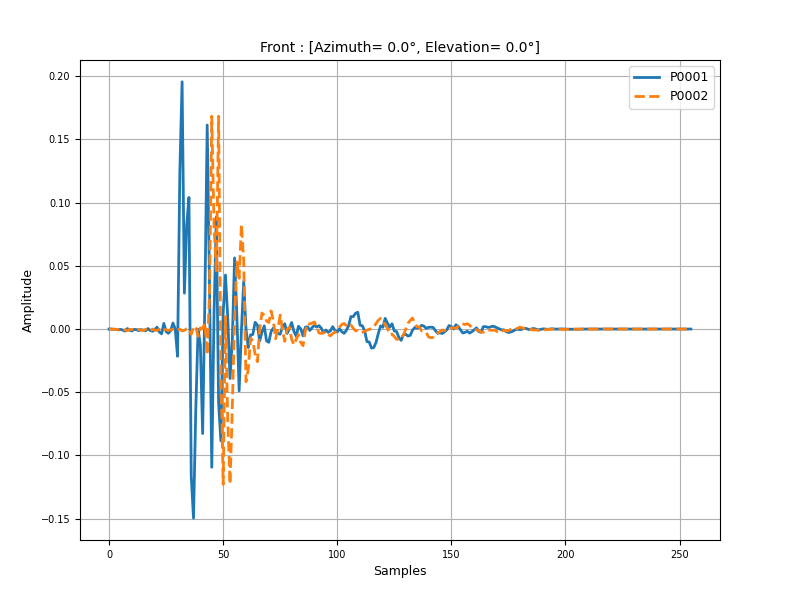
from hrtfpykit.plots import compare_amplitude

hrtf_a = load_hrtf(hrtf_path_a)
hrtf_b = load_hrtf(hrtf_path_b)
compare_amplitude(
    [hrtf_a, hrtf_b],
    positions="front",
    ear="left",
    x_axis="samples",
    legends=["P0001", "P0002"],
    line_styles=["-", "--"],
)
from hrtfpykit.hrtf import load_hrtf
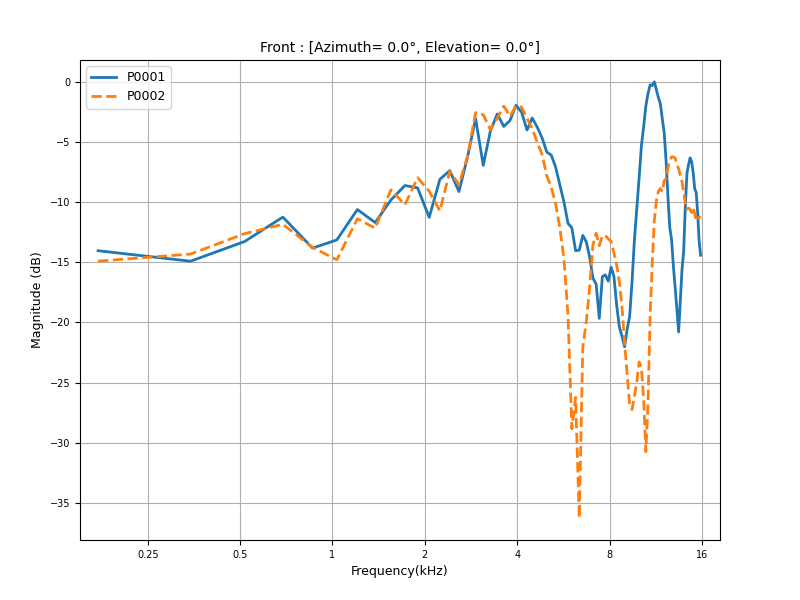
from hrtfpykit.plots import compare_magnitude

hrtf_a = load_hrtf(hrtf_path_a)
hrtf_b = load_hrtf(hrtf_path_b)
compare_magnitude(
    [hrtf_a, hrtf_b],
    positions="front",
    ear="left",
    x_axis="log",
    unit="db",
    reference="max",
    legends=["P0001", "P0002"],
    line_styles=["-", "--"],
    freq_max=16000.0,
)
from hrtfpykit.hrtf import load_hrtf
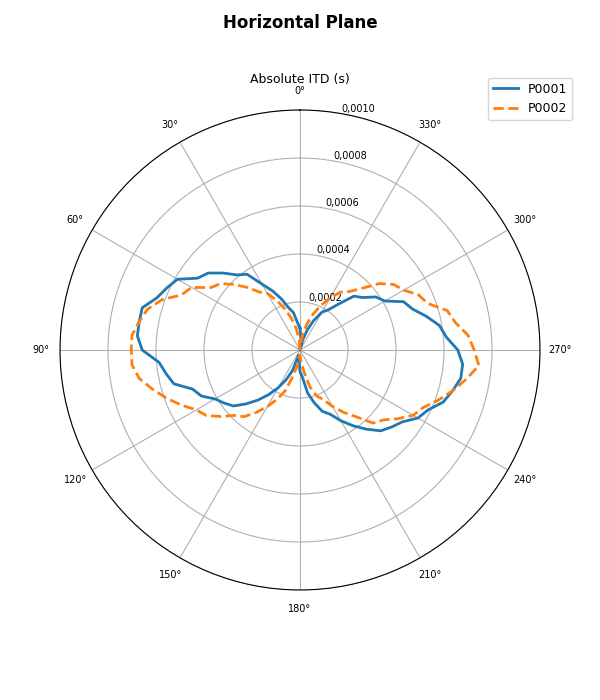
from hrtfpykit.plots import compare_absolute_itd

hrtf_a = load_hrtf(hrtf_path_a)
hrtf_b = load_hrtf(hrtf_path_b)
compare_absolute_itd(
    [hrtf_a, hrtf_b],
    plane_angle=0.0,
    legends=["P0001", "P0002"],
    line_styles=["-", "--"],
)
from hrtfpykit.hrtf import load_hrtf
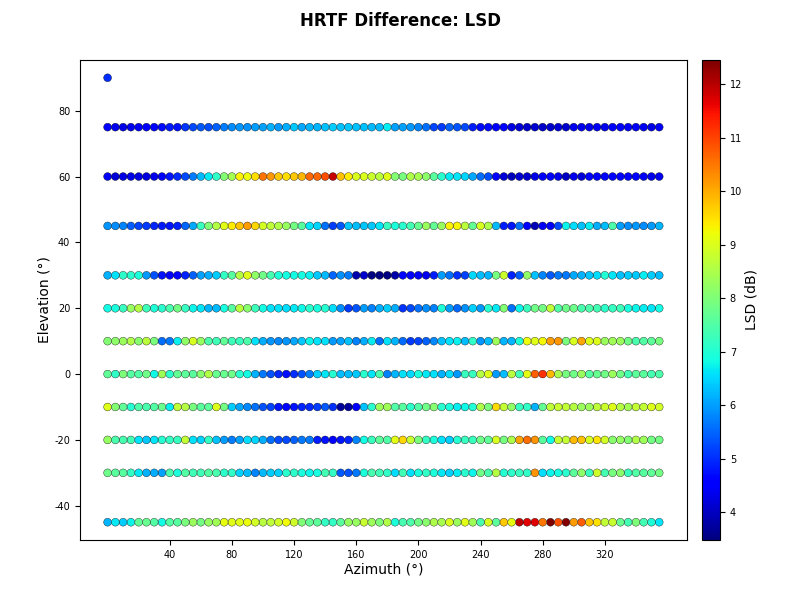
from hrtfpykit.plots import compare_hrtf_difference

hrtf_a = load_hrtf(hrtf_path_a)
hrtf_b = load_hrtf(hrtf_path_b)
compare_hrtf_difference(
    hrtf_a,
    hrtf_b,
    metric="lsd",
    ear="left",
    plot_type="scatter",
)
from hrtfpykit.hrtf import load_hrtf
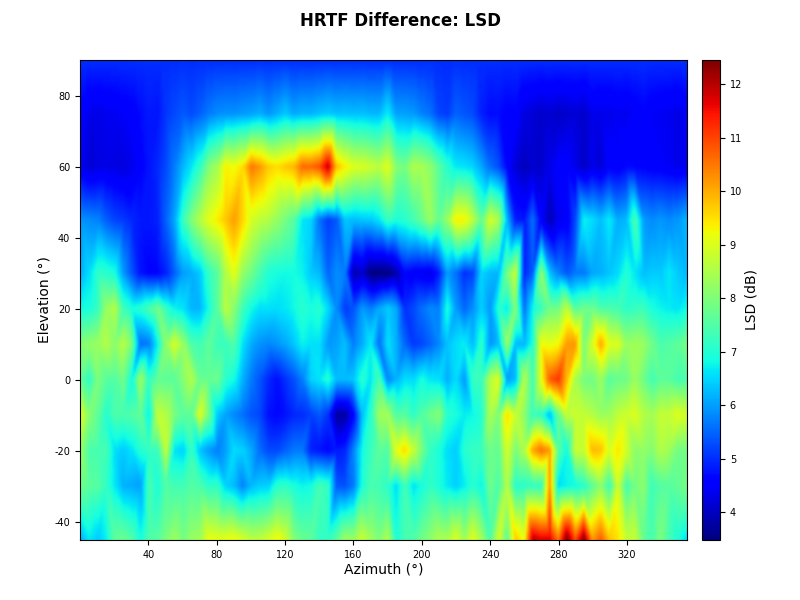
from hrtfpykit.plots import compare_hrtf_difference

hrtf_a = load_hrtf(hrtf_path_a)
hrtf_b = load_hrtf(hrtf_path_b)
compare_hrtf_difference(
    hrtf_a,
    hrtf_b,
    metric="lsd",
    ear="left",
    plot_type="heatmap",
)
hrtfpykit.datasets: Building dataset pipelines
The datasets API builds indexed HRTF samples from
dataset resources. Spec objects such as HRTFSpec,
ITDSpec, and ILDSpec
define which acoustic arrays, metrics, and subject resources are returned as
inputs or targets. The example below downloads a small HUTUBS subset, builds a
dataset, reads one sample, and batches samples for PyTorch with
collate_samples(). For downloads,
local resource layouts, transforms, splits, and batching, continue with
Starting with hrtfpykit.datasets;
for a deeper treatment of specs, see
Mastering hrtfpykit.datasets Specs.
from torch.utils.data import DataLoader

from hrtfpykit.datasets import HUTUBS, HRTFSpec, ILDSpec, ITDSpec
from hrtfpykit.datasets.torch import collate_samples

# Keep the quickstart small: download and build only pp1 through pp10.
selected_subject_ids = tuple(f"pp{i}" for i in range(1, 11))

dataset = HUTUBS(
    root="datasets/hutubs",
    download=True,
    download_resources="hrtf",
    download_hrtf_variant="measured",
    download_server="sofacoustics",
    verify_checksum=True,
    download_subject_ids=selected_subject_ids,
    subject_ids=selected_subject_ids,
    inputs=HRTFSpec(
        domain="frequency",
        signal="tf_magnitude_db",
        ears="left",
        index_by=("subject", "position"),
        position_index=True,
        name="magnitude_db",
    ),
    target=(
        ITDSpec(
            index_by=("subject", "position"),
            output="samples",
            name="itd",
        ),
        ILDSpec(
            index_by=("subject", "position"),
            name="ild",
        ),
    ),
    split="train",
)

# If you already have the measured HUTUBS SOFA files, copy them under
# datasets/hutubs using an accepted local layout and set download=False.

# Read one sample.
sample = dataset[0]

print(sample["inputs"].keys())
print(sample["target"].keys())

# Batch samples for PyTorch.
loader = DataLoader(dataset, batch_size=8, collate_fn=collate_samples)
batch = next(iter(loader))

print(batch["inputs"].keys())
print(batch["target"].keys())
Where to go next
hrtfpykit.sofa for file level SOFA workflows.
hrtfpykit.hrtf for HRTF objects, transforms, metrics, and spherical harmonics.
hrtfpykit.plots for HRTF plots and comparison plots.
hrtfpykit.datasets for public dataset pipelines and sample specs.
Tutorials for guided examples.
Tests for the test suite and local validation workflow.