Quick Start
Installation
The recommended and straightforward installation is:
hrtfpykit requires Python 3.12 or newer.
pip install hrtfpykit
For local installation from source:
git clone https://github.com/ArielAlvarez-Martinez/hrtfpykit.git
cd hrtfpykit
pip install .
For local development from source:
git clone https://github.com/ArielAlvarez-Martinez/hrtfpykit.git
cd hrtfpykit
pip install -e ".[test,docs]"
Main imports
These imports cover the main hrtfpykit workflows: SOFA loading, HRTF objects, spherical harmonics, comparison plots, reconstruction plots, dataset classes, dataset specs, and batching utilities.
from hrtfpykit.sofa import load_sofa

from hrtfpykit.hrtf import load_hrtf
from hrtfpykit.hrtf import SH, sht, sht_inverse, sht_error

from hrtfpykit.plots import compare_amplitude, compare_magnitude, compare_absolute_itd, compare_lsd_plane
from hrtfpykit.plots import sht_reconstruction_comparison, sht_reconstruction_error

from hrtfpykit.datasets import HUTUBS, SONICOM
from hrtfpykit.datasets import HRTFSpec, ITDSpec, ImageSpec, collate_samples
Download Two SONICOM Example HRTFs
The examples below use the first two public SONICOM subjects. Run this setup
once to download the measured 44.1 kHz FreeFieldComp HRTF resources for
P0001 and P0002 and store their local paths.
from pathlib import Path

from hrtfpykit.datasets import SONICOM

root = Path("datasets/sonicom")

# Exclude all SONICOM subjects except P0001 and P0002.
exclude_subject_ids = tuple(f"P{i:04d}" for i in range(3, 401))

# Download only the measured 44.1 kHz FreeFieldComp HRTF resources for P0001 and P0002.
SONICOM(
    root=root,
    download=True,
    download_resources="hrtf",
    download_hrtf_variant={
        "type": "measured",
        "sample_rate": 44100,
        "version": "FreeFieldComp",
    },
    exclude_subject_ids=exclude_subject_ids,
    verify_checksum=True,
)

hrtf_path_a = (
    root
    / "P0001"
    / "HRTF"
    / "HRTF"
    / "44kHz"
    / "P0001_FreeFieldComp_44kHz.sofa"
)
hrtf_path_b = (
    root
    / "P0002"
    / "HRTF"
    / "HRTF"
    / "44kHz"
    / "P0002_FreeFieldComp_44kHz.sofa"
)
hrtfpykit.sofa: Working with SOFA files
The sofa API is the file structure layer of hrtfpykit. It represents dimensions, variables, metadata, conventions, and raw stored values as structured Python objects. HRTF objects, plots, and dataset pipelines build on this layer when they need SOFA-backed data, while the same layer can inspect and edit the stable SOFA conventions registered in hrtfpykit.
import numpy as np

from hrtfpykit.sofa import load_sofa

# Load SOFA file
sofa = load_sofa(hrtf_path_a)

# SOFA file summary
print(sofa.summary())

# Access SOFA file metadata
print(sofa.GlobalAttributes.get("SOFAConventions").value)
print(sofa.Dimensions.get_names())
print(sofa.Variables.get_names())

# Access SOFA file data
source_positions = sofa.Variables.get("SourcePosition").value
print(source_positions.shape)

if "Data.IR" in sofa.Variables.get_names():
    ir = sofa.Variables.get("Data.IR").value
    print(ir.shape)

# Modify SOFA data on a clone
editable = sofa.clone()
editable.create_global_attribute("ExampleNote", "edited with hrtfpykit")

if "Data.IR" in editable.Variables.get_names():
    edited_ir = np.array(editable.Variables.get("Data.IR").value, copy=True)
    edited_ir[..., :8] = 0.0
    editable.modify_variable("Data.IR", edited_ir)

# Save SOFA file
saved_path = editable.save("P0001_FreeFieldComp_44kHz_edited.sofa", overwrite=True)
print(saved_path)
hrtfpykit.hrtf: Handling HRTF objects
The hrtf API is the HRTF object layer for SOFA files
that follow the SimpleFreeFieldHRIR or SimpleFreeFieldHRTF conventions.
It loads those files through the SOFA API and keeps IR data, TF data, source
positions, and the backed SOFA object synchronized. Selection and transform
methods return new HRTF objects, leaving the original state available for
inspection, comparison, reset, plotting, metrics, and save workflows.
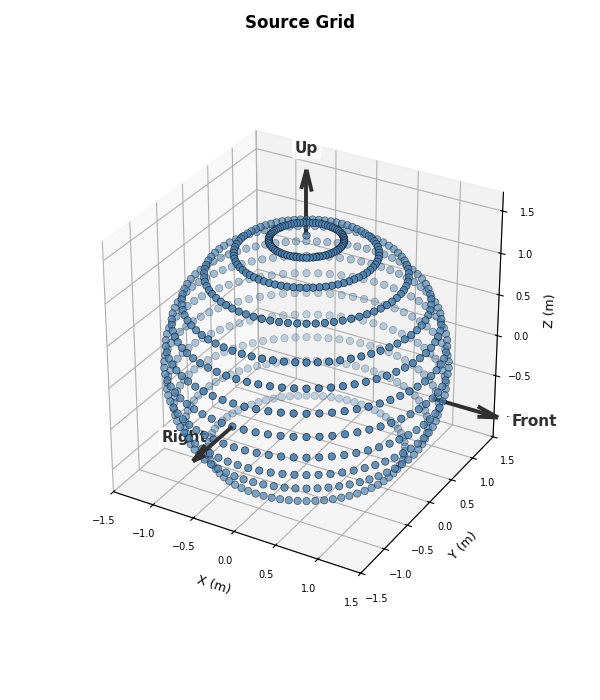
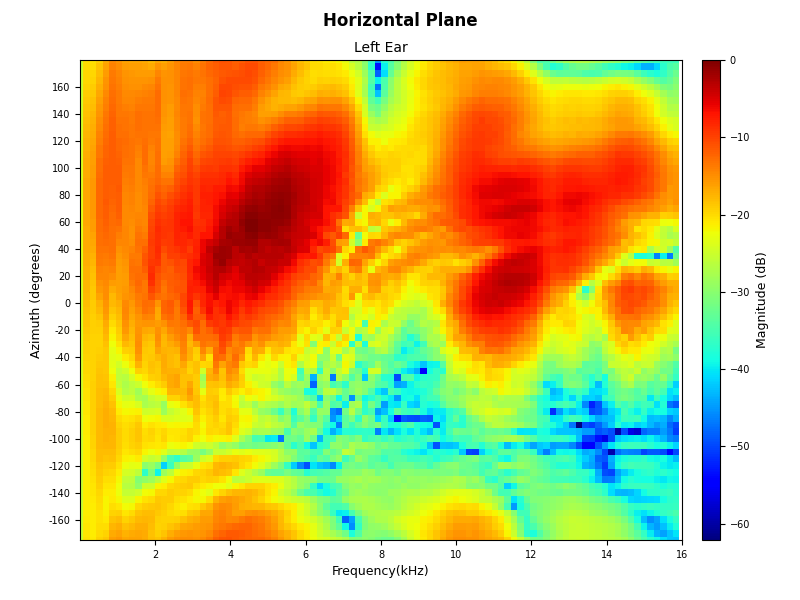
Built-in plots for one loaded HRTF state are also part of this object surface.
They are called as methods on HRTF objects, for
example plot_magnitude()
or plot_source_grid().
Those methods use the current IR,
TF, and
Sources state of the object, so selections
and transforms are reflected directly in the generated figures.
from hrtfpykit.hrtf import load_hrtf

# Load HRTF file
hrtf = load_hrtf(hrtf_path_a)

# Access SOFA backed object
sofa = hrtf.Sofa
print(sofa.summary())

# Inspect HRTF metadata
print(hrtf.SOFAConventions)
print(hrtf.fft_length)

# Inspect time domain data
print(hrtf.IR.values.shape)
print(hrtf.IR.sample_rate)
print(hrtf.IR.ir_length)
print(hrtf.IR.ir_duration)

# Inspect frequency domain data
print(hrtf.TF.values.shape)
print(hrtf.TF.frequency_bins.shape)
print(hrtf.TF.min_frequency_bin)
print(hrtf.TF.max_frequency_bin)

# Inspect source positions
print(hrtf.Sources.get_positions().shape)
print(hrtf.Sources.get_azimuth_angles())
print(hrtf.Sources.get_elevation_angles())

# Create a selected HRTF copy
selected = hrtf.select(
    positions=["front", "left", "right"],
    ear="both",
    start_sample=0,
    end_sample=128,
)

# Create a modified HRTF copy
windowed = selected.transform.apply_window("hann")
print(hrtf.is_transformed())
print(windowed.is_transformed())

# Synchronize current HRTF data into its SOFA object
windowed.update_sofa(
    change_sofa_dimensions=True,
    sofa_convention="SimpleFreeFieldHRIR",
)

# Reset in-memory data from the backed SOFA object
restored = windowed.reset()

# Save HRTF file
saved_path = restored.save(
    "P0001_FreeFieldComp_44kHz_selected_windowed.sofa",
    overwrite=True,
    change_sofa_dimensions=True,
    sofa_convention="SimpleFreeFieldHRIR",
)

print(saved_path)
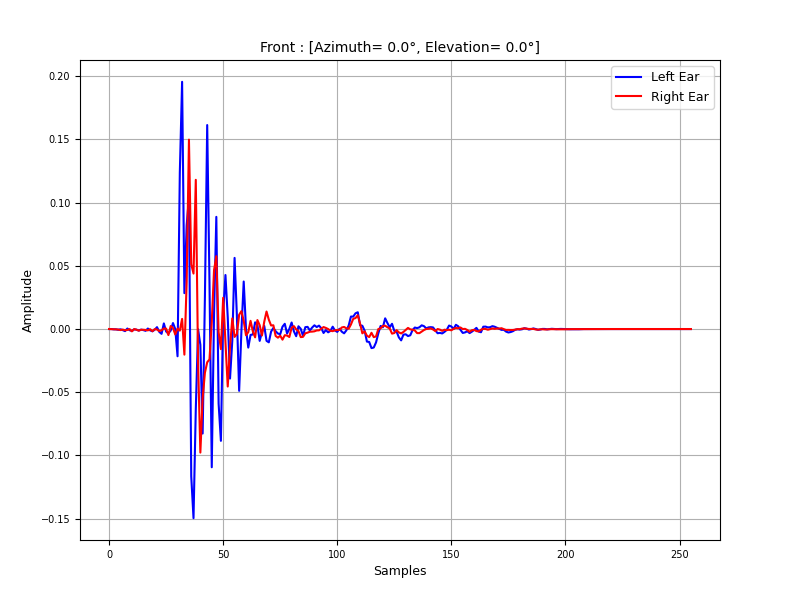
from hrtfpykit.hrtf import load_hrtf

hrtf = load_hrtf(hrtf_path_a)
hrtf.plot_amplitude(
    positions="front",
    ear="both",
    x_axis="samples",
)
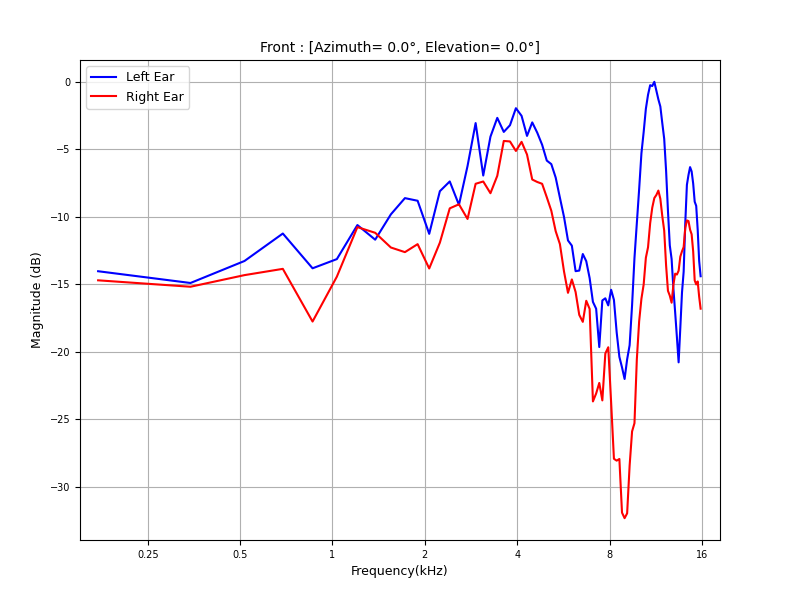
from hrtfpykit.hrtf import load_hrtf

hrtf = load_hrtf(hrtf_path_a)
hrtf.plot_magnitude(
    positions="front",
    x_axis="log",
    ear="both",
    reference="max",
    freq_max=16000.0,
)
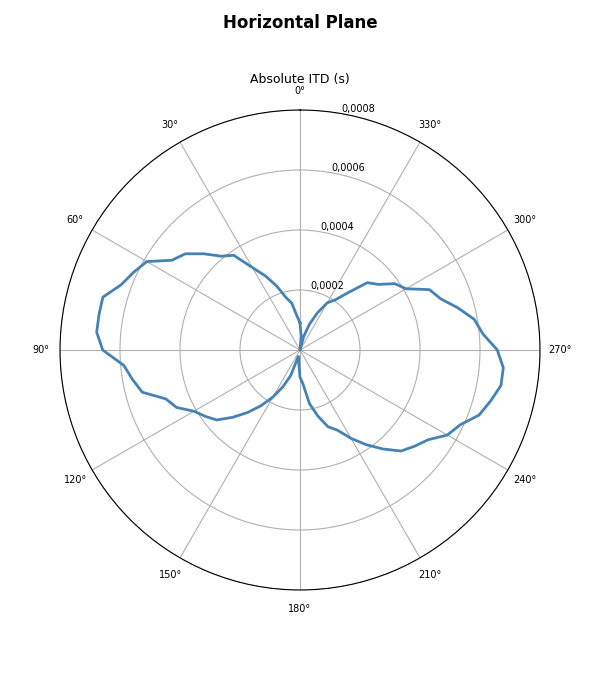
from hrtfpykit.hrtf import load_hrtf

hrtf = load_hrtf(hrtf_path_a)
hrtf.plot_absolute_itd(elevation_angle=0.0)
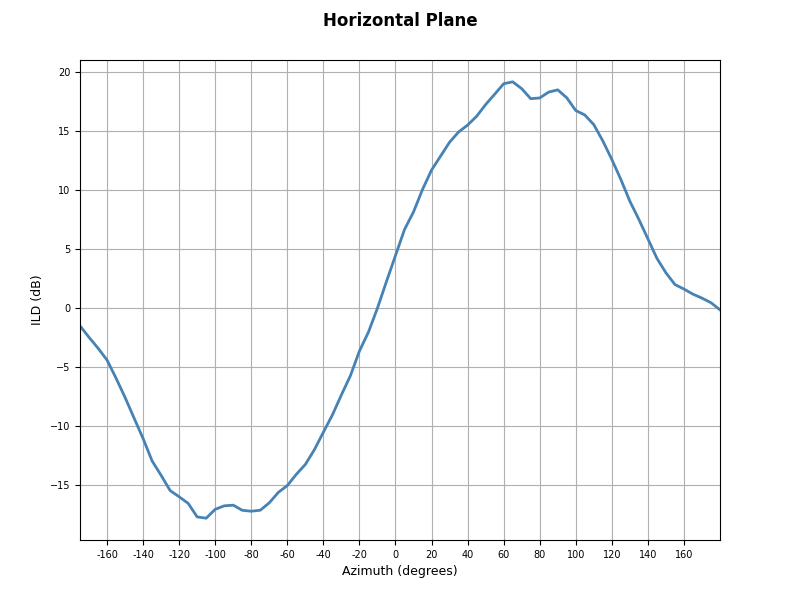
from hrtfpykit.hrtf import load_hrtf

hrtf = load_hrtf(hrtf_path_a)
hrtf.plot_ild_curve(elevation_angle=0.0)
from hrtfpykit.hrtf import load_hrtf

hrtf = load_hrtf(hrtf_path_a)
hrtf.plot_source_grid()
from hrtfpykit.hrtf import load_hrtf

hrtf = load_hrtf(hrtf_path_a)
hrtf.plot_spectrum_plane(
    plane="horizontal",
    elevation_angle=0.0,
    x_axis="linear",
    ear="left",
    freq_max=16000.0,
)
hrtfpykit.plots: Visualizing HRTF data
The plots API is the visualization layer of hrtfpykit.
In the Quick Start, this section focuses on functions imported from
hrtfpykit.plots: comparison plots for multiple HRTFs and
spherical-harmonic reconstruction plots. Built-in plots for one loaded HRTF
state are accessed as methods on HRTF objects and are
shown in the hrtf API section above.
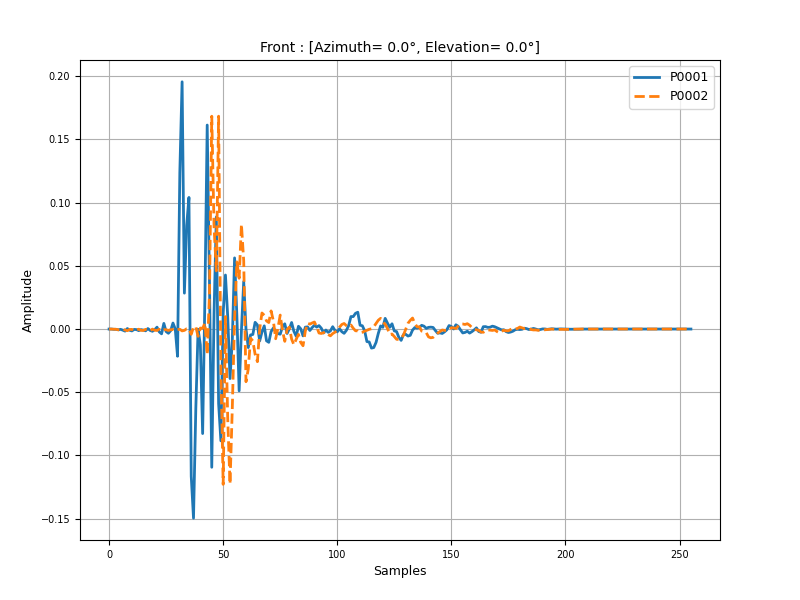
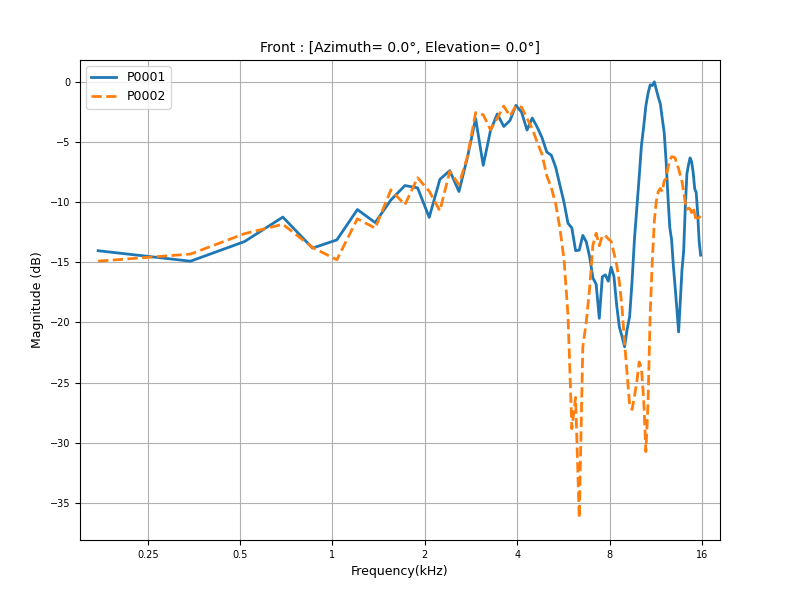
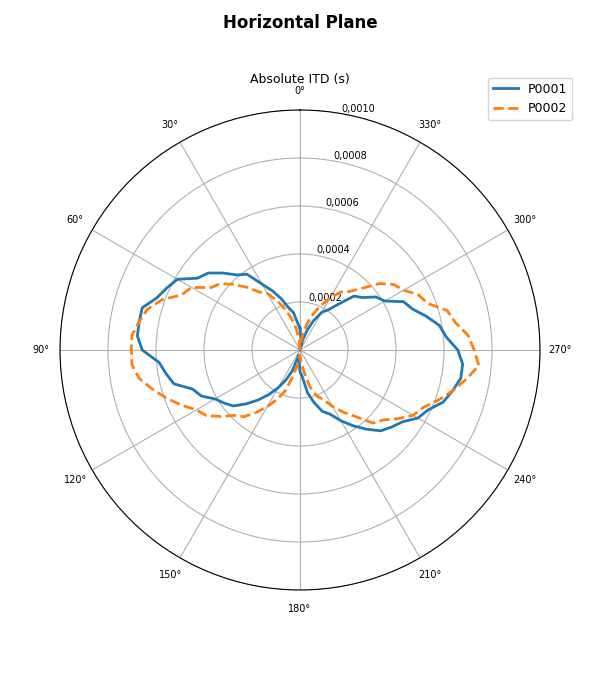
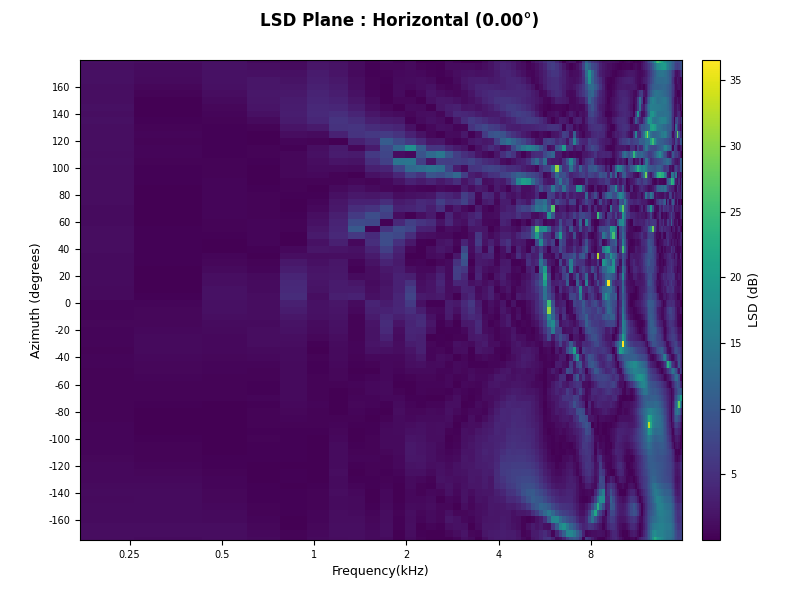
Comparison functions place multiple HRTFs in the same visual frame for
amplitude, magnitude, ITD, ILD, and LSD inspection. Spherical harmonic plot
functions visualize SHT reconstruction quality and reconstruction error for
workflows based on SH,
sht(), and related harmonic representations.
from hrtfpykit.hrtf import load_hrtf
from hrtfpykit.plots import compare_amplitude

hrtf_a = load_hrtf(hrtf_path_a)
hrtf_b = load_hrtf(hrtf_path_b)
compare_amplitude(
    [hrtf_a, hrtf_b],
    positions="front",
    ear="left",
    x_axis="samples",
    legends=["P0001", "P0002"],
    line_styles=["-", "--"],
)
from hrtfpykit.hrtf import load_hrtf
from hrtfpykit.plots import compare_magnitude

hrtf_a = load_hrtf(hrtf_path_a)
hrtf_b = load_hrtf(hrtf_path_b)
compare_magnitude(
    [hrtf_a, hrtf_b],
    positions="front",
    ear="left",
    x_axis="log",
    unit="db",
    reference="max",
    legends=["P0001", "P0002"],
    line_styles=["-", "--"],
    freq_max=16000.0,
)
from hrtfpykit.hrtf import load_hrtf
from hrtfpykit.plots import compare_absolute_itd

hrtf_a = load_hrtf(hrtf_path_a)
hrtf_b = load_hrtf(hrtf_path_b)
compare_absolute_itd(
    [hrtf_a, hrtf_b],
    elevation_angle=0.0,
    legends=["P0001", "P0002"],
    line_styles=["-", "--"],
)
from hrtfpykit.hrtf import load_hrtf
from hrtfpykit.plots import compare_lsd_plane

hrtf_a = load_hrtf(hrtf_path_a)
hrtf_b = load_hrtf(hrtf_path_b)
compare_lsd_plane(
    hrtf_a,
    hrtf_b,
    plane="horizontal",
    ear="right",
    elevation=0.0,
    x_axis="log",
    freq_max=16000.0,
    colormap="viridis",
)
hrtfpykit.datasets: Building dataset pipelines
The datasets API is the dataset construction layer
for public HRTF resources. Dataset objects are configured with
spec objects such as HRTFSpec,
ITDSpec, and ILDSpec,
which declare the acoustic values, cue metrics, and subject resources exposed
as sample inputs and targets. The same pattern can align HRTFs with
anthropometry, metadata, meshes, images, videos, or other available resources,
then read one sample directly or batch samples for PyTorch with
collate_samples().
from torch.utils.data import DataLoader
from hrtfpykit.datasets import HUTUBS, HRTFSpec, ILDSpec, ITDSpec, collate_samples

dataset = HUTUBS(
    root="datasets/hutubs",
    inputs=HRTFSpec(
        domain="frequency",
        signal="tf_magnitude_db",
        ears="left",
        index_by=("subject", "position"),
        position_index=True,
        name="magnitude_db",
    ),
    target=(
        ITDSpec(
            index_by=("subject", "position"),
            output="samples",
            name="itd",
        ),
        ILDSpec(
            index_by=("subject", "position"),
            mode="broad-band",
            name="ild",
        ),
    ),
    split="train",
)

# Read one sample
sample = dataset[0]

print(sample["inputs"].keys())
print(sample["target"].keys())

# Batch samples for PyTorch
loader = DataLoader(dataset, batch_size=8, collate_fn=collate_samples)
batch = next(iter(loader))

print(batch["inputs"].keys())
print(batch["target"].keys())
Where to go next
hrtfpykit.sofa for file level SOFA workflows.
hrtfpykit.hrtf for HRTF objects, transforms, metrics, and spherical harmonics.
hrtfpykit.plots for HRTF plots and comparison plots.
hrtfpykit.datasets for public dataset pipelines and sample specs.
Tutorials for guided examples.
Tests for the test suite and local validation workflow.